For Visual Studio 2022 & 2026 · Bring your own key

One chat panel. Any provider. Your keys, your models.

Tempr is a bring-your-own-key (BYOK) extension: a rich in-IDE chat, inline completion, and agent toolset inside Visual Studio that works with first-party providers (OpenAI, Anthropic, Google) and aggregators (OpenRouter and others). Add your own API key and pick whichever model fits the task — nothing routed through a shared pool.

Choose a plan See it in action

BYOKbring your own key(s)
First-party + aggregatorsOpenAI, Anthropic, Google, OpenRouter & more
3plans: Standard, Pro & Teams (soon)

Everything you need, right inside the IDE

No more tab-switching to a browser. Chat, complete, and refactor without ever leaving Visual Studio.

Bring your own key(s)

Connect directly with first-party providers (OpenAI, Anthropic, Google, xAI) or an aggregator (OpenRouter and others) using your own API key — no shared usage pool, no vendor lock-in. Required on every plan.

Rich in-IDE chat

Rich Markdown and code block rendering, one-click copy/insert at cursor, slash commands (/explain, /fix, /tests, /doc), and full chat history you can revisit anytime.

Agent mode, your way

A real tool-calling loop that reads, searches, and edits your codebase and runs whitelisted commands — choose Interactive (approve every change), Bypass (auto-apply edits), or Autopilot.

Named agent personas

Type @debugger, @test, @security, @review, @docs, @refactor, @modernize, @profiler, @git, or @plan for a specialist prompt and tool scope. Standard unlocks the full built-in set; Pro adds custom personas you define yourself.

Multi-agent delegation

The agent can hand focused sub-tasks off to specialist personas mid-turn — e.g. delegating root-cause analysis to @debugger while it keeps working — running several in parallel when it helps.

Real semantic code search

Embedding-based search over your solution finds conceptually related code even when the wording doesn't match — not just grep with extra steps.

Debugger-aware

The agent can inspect the live call stack and locals and evaluate expressions during a debugging session, for context-aware help grounded in your actual running process.

Test & solution aware

Lists and runs your tests with structured pass/fail results, reads live compiler diagnostics, and understands your solution's project references and call graph.

Inline completion

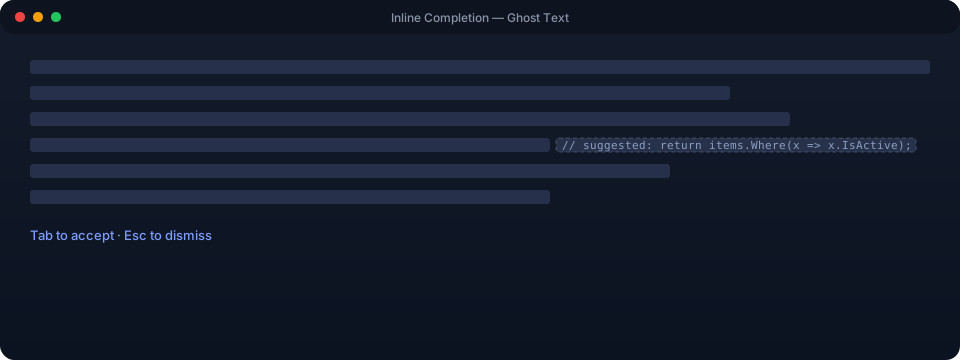
Ghost-text style inline completions that suggest the next line as you type, tuned per-scenario to the model you prefer.

Model Context Protocol (MCP)

Connect external MCP servers to extend the agent with your own tools and data sources.

Local-first & cloud sync

Chat sessions, tool preferences, and custom personas are stored locally by default, with optional cloud sync (Standard+) so your setup follows you across machines.

Simple, tiered licensing

Standard and Pro (and Teams, coming soon) both unlock the full model catalog — Pro gets new models immediately, Standard about 7 days later — plus deeper agent features like custom personas, multiple saved sessions, and higher agent-turn limits on Pro. Managed via Stripe subscriptions with automatic license-key issuance.

Bring a key from any of these

This is the actual supported-provider allowlist Tempr enforces server-side today — not a wishlist. Add your own API key for any of them and Tempr talks to that provider directly.

First-party model providers

The model creator's own API.

AI21 LabsAI21 Labs
Aleph AlphaAleph Alpha
Alibaba Cloud (DashScope)Alibaba Cloud
AnthropicAnthropic
CodestralCodestral
CohereCohere
DeepSeekDeepSeek
Google GeminiGemini
Inception LabsInception Labs
Meta (Llama API)Meta (Llama API)
Meta AIMeta AI
MiniMaxMiniMax
MistralMistral
Moonshot AIMoonshot AI
MorphMorph
OpenAIOpenAI
PerplexityPerplexity
Public AIPublic AI
Sarvam AISarvam AI
xAIxAI
Xiaomi MiMoXiaomi MiMo
Z.aiZ.ai

Inference providers

Hosts other companies' open-weight models on its own infrastructure.

Together AITogether AI

Gateways & aggregators

One key, routed to many providers and models through a single API.

OpenRouterOpenRouter

More providers are added to the allowlist regularly — if yours isn't listed yet, let us know and we'll look at adding it.

See it in action

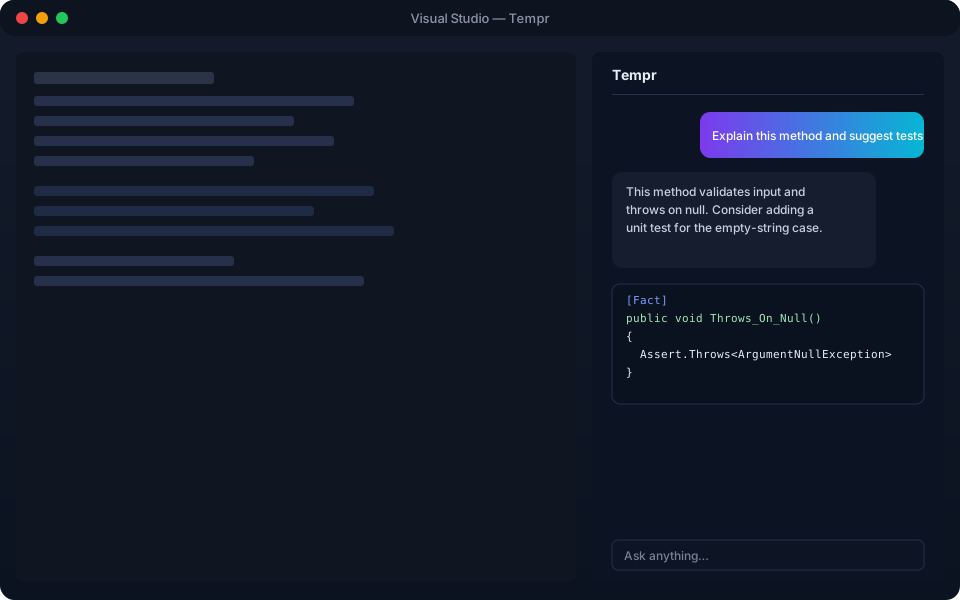
A closer look at the chat panel and inline completions inside Visual Studio. (Illustrative mockups — actual UI may vary.)

Mockup of the Tempr panel docked inside Visual Studio, showing a conversation and a generated unit test
The chat tool window, docked alongside your editor, with Markdown rendering and one-click code actions.
Mockup of an inline ghost-text code completion suggestion in the editor
Inline ghost-text completions appear as you type — press Tab to accept.

How it works

1. Install the extension

Install the Tempr extension into Visual Studio from the Marketplace or a VSIX package.

2. Activate a license

Subscribe to Standard or Pro — license keys are emailed automatically after checkout, and activate in seconds inside the extension.

3. Add your API key(s)

Bring your own key for a first-party provider (OpenAI, Anthropic, Google) or an aggregator (OpenRouter and others) — stored encrypted, locally.

4. Chat with any model

Open the tool window, pick a model from the dropdown, and start chatting, completing, or delegating to an agent.

What developers are saying

Illustrative quotes for preview purposes — replace with real customer feedback before launch.

"I like that it's BYOK — I use my own OpenAI key for day-to-day work and my OpenRouter key when I want to try something like DeepSeek."

— Backend developer, fintech startup

"The agent personas are a great shortcut — @debugger genuinely saves me time chasing down flaky tests."

— Senior engineer, SaaS platform

"No usage pool, no rate-limit surprises — it's just my own key talking straight to the provider. Exactly what I wanted."

— Independent contractor

Simple, transparent pricing

Bring your own provider key(s), pick the plan that matches how you work. Cancel anytime.

Limited-time pricing Subscribe now to lock in today's rate before it goes up. Every paid plan includes a 7-day free trial.

Every plan is bring-your-own-key — your license controls which models you're entitled to use, not who pays for the tokens.

Pro
$20 / mo Limited-time

7-day free trial

  • Immediate access to new models with your own key(s) — no waiting window
  • Custom personas, multiple saved sessions, higher agent-turn limits
  • Priority handling on feature requests

Start free trial

TeamsComing soon
Contact us
  • Everything in Pro, for every seat
  • Centralized billing and seat management
  • Shared team personas, config, and admin controls

Get notified

CapabilityStandardProTeams Soon
Requires your own provider API key(s)✔️✔️✔️
Model catalogFull (new models after ~7 days)Full (immediate)Full (immediate)
Chat & inline completion✔️✔️✔️
Agent tooling & built-in personas✔️✔️✔️
Custom personas✔️✔️, shared across the team
Multi-agent delegation✔️✔️✔️
External MCP servers (Model Context Protocol)✔️✔️✔️
Real semantic code search✔️✔️✔️
Cloud sync (sessions, tools, personas)✔️✔️✔️, team-wide
Saved chat sessions1MultipleMultiple
Agent-turn step limit50100100
Delegated sub-agent calls per turn388
Parallel sub-agent delegation2 at a time8 at a time8 at a time
Priority feature requests✔️✔️
Centralized billing & seat management✔️
Admin controls & usage visibility✔️

Teams isn't built yet — pricing and exact feature set are still being finalized. Click "Get notified" above and we'll follow up when it's ready.

FAQ

Yes — this is a bring-your-own-key (BYOK) extension. Add a key for a first-party provider (OpenAI, Anthropic, Google, xAI) or an aggregator (OpenRouter and others), and the extension talks to that provider directly using your key.
After you start checkout, a license key is issued by the server and emailed to the address used at checkout — including during your 7-day free trial. You can then activate it in the extension.
Every paid plan (Standard and Pro) starts with a 7-day free trial. Subscribe, use the full plan for a week, and cancel anytime before the trial ends if it's not for you — you won't be charged. Current pricing is limited-time, so the rate you sign up at is the rate you keep.
Visual Studio 2026 and Visual Studio 2022 (17.x).
Yes — plans are managed as Stripe subscriptions, so you can upgrade, downgrade, or cancel at any time from your Stripe customer portal. Changes take effect on your next billing cycle.
Both get the full model catalog with your own key(s) and all built-in agent personas. Pro adds: immediate access to newly-added models (Standard waits about 7 days), the ability to create and save your own custom personas, more than one saved chat session at a time, a higher agent-turn step limit (100 vs. 50), and priority handling on feature requests.
Teams is coming soon — centralized billing, seat management, shared team personas/config, and admin visibility into usage, built on top of everything in Pro. It's not available yet; use the "Get notified" link on the pricing card to hear when it ships.
A first-party provider (like OpenAI, Anthropic, or Google) hosts its own models directly. An aggregator (like OpenRouter) routes a single API key to 300+ models from many providers through one consistent interface. You can bring keys for either — or both.
No — with BYOK, your requests go directly to the provider or aggregator you configure, using your own key. We don't proxy your prompts through a shared pool or store your code beyond what's needed to enforce your license tier.
We don't offer refunds. You can cancel anytime from your Stripe customer portal to stop future billing — every paid plan starts with a 7-day free trial, so you can try it out before you're charged.

Contact us

Questions about pricing, a Teams plan, or something not working as expected — send a message and we'll get back to you.

Prefer email? Reach us directly at contact@temprhq.io.