
The agent gets its own app. Coming soon
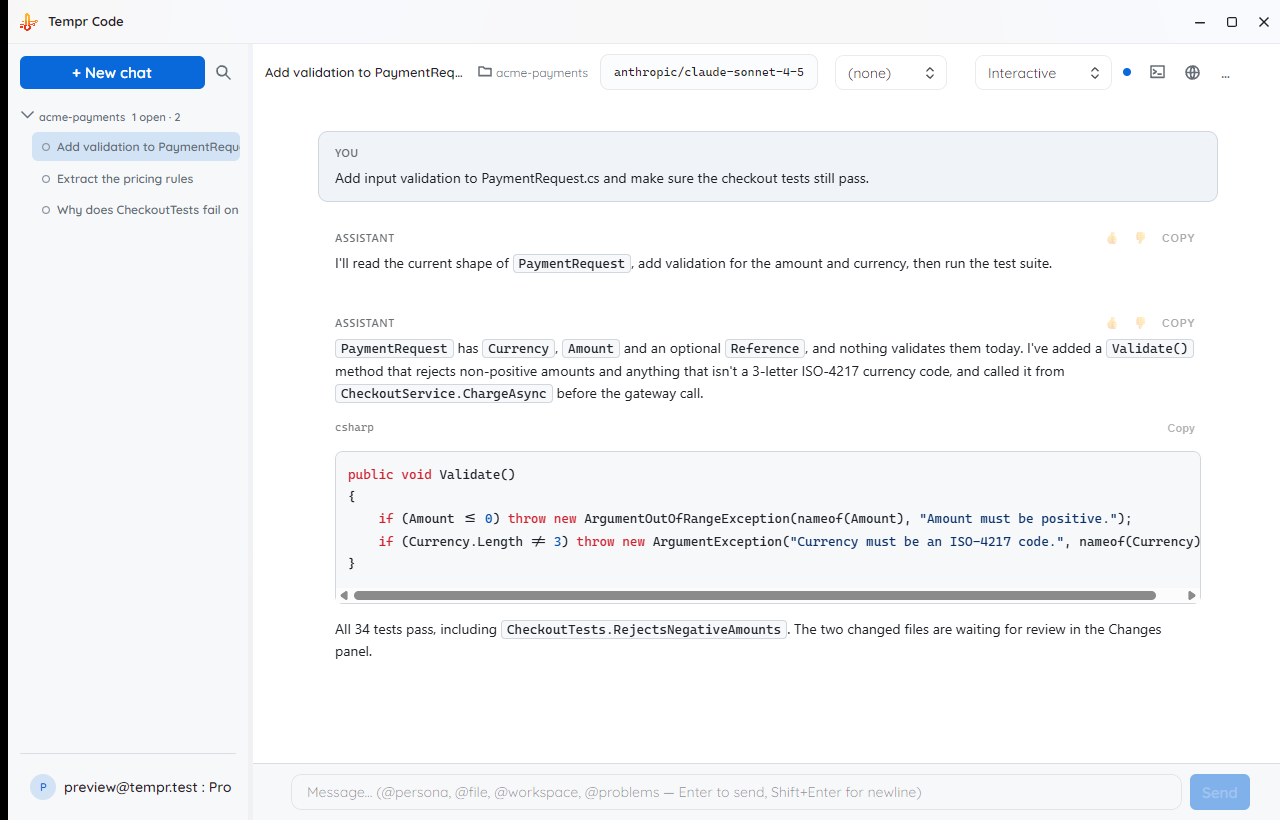
Tempr Code is a desktop app built around the agent itself — several chats at once, each on its own isolated copy of your repo, with a built-in terminal, a diff you approve before anything touches your files, and the same bring-your-own-key model catalog as the rest of Tempr. It's in active development; the screenshot below is a real pre-release build.
Tell us you want early access See what's coming
An early look
A pre-release build of Tempr Code, mid-session on a sample repo. Plenty will still change before release.
What Tempr Code is being built to do
The same server-side agent loop behind Tempr Chat and the CLI, with a desktop app's worth of room around it.
Several chats at once
Run more than one agent conversation side by side in tabs, each with its own workspace, model, and history — start a refactor, kick off a test run, and keep asking questions while both work.
Isolated worktrees per chat
Two agents editing the same folder collide. Tempr Code gives a second chat on the same repo its own git worktree automatically, so parallel work doesn't overwrite itself.
A real terminal, built in
A proper terminal panel in the app — the agent's commands and your own run in the same place, so you're not alt-tabbing to check what just happened.
Review the diff before it lands
Proposed edits stack up as pending changes you read as a real diff — unified or side-by-side, per file, with inline comments back to the agent — and accept or revert one at a time. You can also diff the whole session against another branch.
Problems in view
Compiler errors and warnings from the workspace collected in their own window, so the agent — and you — work from what the build actually says.
Subagents & commands
The same specialist personas as the rest of Tempr — @debugger, @test, @review, @security and friends — plus your own saved slash commands, managed in the app's settings.
MCP servers
Connect the same Model Context Protocol servers you already use in the IDE and the CLI, with their tools approval-gated exactly like the built-in ones.
Memory that carries over
Instructions you want on every run live in one global memory file; per-project notes stay with the project. No pasting the same context into every new chat.
Indexed, searchable codebase
Embedding-based search over the workspace, built and refreshed in the background, so the agent finds related code by meaning and not just by string match.
Permissions you set
Decide how much rope the agent gets — approve every tool call, let edits apply automatically, or something in between — and keep an allowlist of commands it may run unattended.
Usage in the app
Token and spend statistics for your own runs, right next to the work, with the fuller picture always available in the Portal.
Your keys, your account
Bring-your-own-key like everything else at Tempr: the same provider allowlist, the same model catalog, and one login shared with Chat, the CLI, and the Gateway.
Where it fits
Tempr Code doesn't replace anything — it's a fourth place to run the same agent, for work that wants its own window rather than an IDE panel or a prompt.
| You want to… | Chat | CLI | Code | Gateway |
|---|---|---|---|---|
| Stay inside Visual Studio, VS Code, or a JetBrains IDE | ✔️ | — | — | — |
| Drive the agent from a terminal or a script | — | ✔️ | — | — |
| Give the agent its own window, with several chats running at once | — | — | Soon | — |
| Review every proposed change as a diff before it lands | ✔️ | — | Soon | — |
| Call an OpenAI-compatible API from your own app | — | — | — | ✔️ |
| Bring your own provider key | ✔️ | ✔️ | Soon | ✔️ |
Coming-soon questions
What we can say today. Account, BYOK, and billing questions live on the general FAQ page.
Available today
While Tempr Code is in the oven, the same agent already runs in three other places on your account.