

Popular remote MCP servers, with sign-in filled in
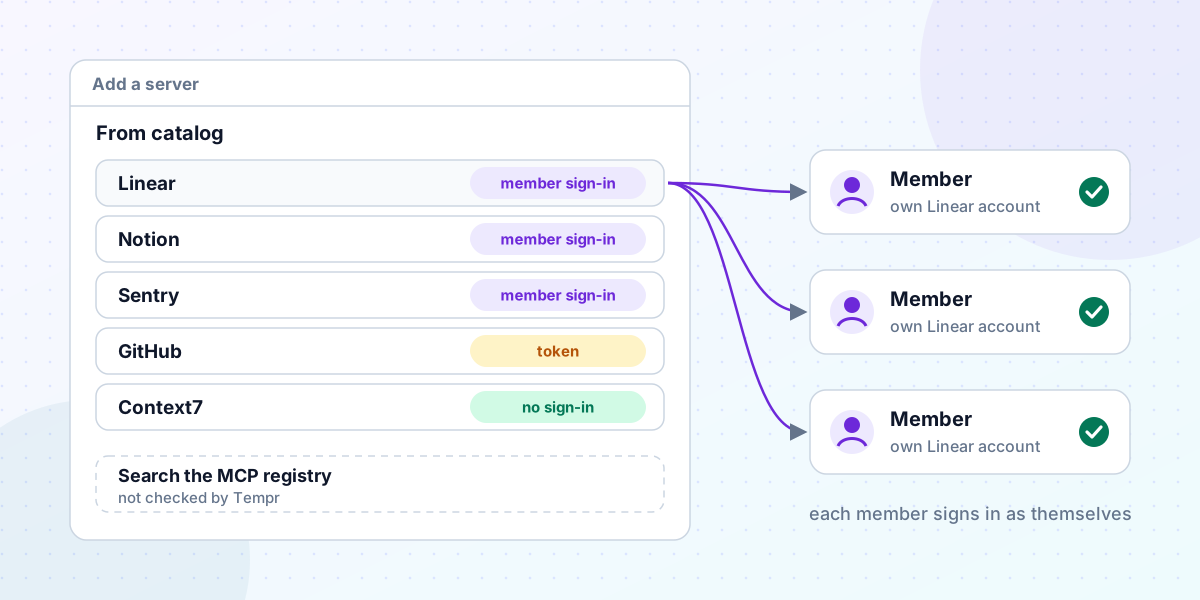
Adding a remote MCP server to a team setup used to start with homework. Find the server's address. Work out whether it wants an API key, a bearer token or an OAuth sign-in. If it's OAuth, find out whether the provider lets a client register itself, or whether someone has to create an app in a developer console first.
None of that is hard, but it's the kind of thing that ends with one person pasting their own token into a shared config because it was the quickest way to get the tool working. This week's change to the Portal is meant to remove that step.
60 servers, address and sign-in included
"Add a server" in the Portal now has a catalog of 60 remote MCP servers, such as Linear, Notion, Sentry, Atlassian, Stripe, GitHub, Datadog and GitLab. Pick one and its URL is filled in. What happens next depends on how the server signs people in:
- 49 sign people in with OAuth, and Tempr can register itself with them. For these, member sign-in is turned on as you save, so each member signs in with their own account.
- Asana, Box and HubSpot use OAuth too, but register no clients on their own. You create an OAuth app in the provider's developer console and add its client ID and secret on the server's card.
- GitHub starts with a personal access token in an
Authorizationheader. Register a GitHub OAuth app and you can switch it to member sign-in instead. - Seven need no sign-in, such as Context7, DeepWiki, Hugging Face and Microsoft Learn.
The full list is in the MCP docs. Any server that isn't on it still works the old way: choose Remote (HTTP) and enter its URL.
What "checked" means
We checked every server on the list when we added it, on October 21, 2026, and it's worth being precise about what that covered.
For each one, Tempr sent an MCP initialize request without credentials and read the server's OAuth metadata, the same discovery Tempr runs when member sign-in is turned on. That confirms the address answers as an MCP server and tells us which kind of sign-in it expects, which is how the list knows that Linear registers clients by itself and Asana doesn't.
It isn't a full sign-in. Signing in to all 60 would need an account with every provider, and we didn't do that. A provider can also change its server after we checked it. So the catalog saves you the research, but the first real sign-in is still the test. When you save an OAuth server, the Portal tells you to sign in yourself from its card, which also lets agents list its tools.
Searching the MCP registry
Below the list, Search the MCP registry finds remote servers in the official MCP registry, which lists well over a thousand. Picking one fills in its URL and any headers it says it takes, such as an API key. When you save it, Tempr checks whether the server asks for OAuth. If it does, member sign-in is turned on; if it doesn't, can't be reached, or you filled in a header yourself, the server keeps the headers you stored.
Tempr hasn't checked these, and the Portal says so: look at who publishes a server before you add it. The search ranks results to help with that:
- A server hosted on the publisher's own domain, the one in its registry name, says so and ranks ahead of equally good matches.
- A server run by a hosting service on someone else's behalf ranks last, with a note.
- A listing that charges per call also ranks last, with a note, because the Gateway refuses paid tools. The paid MCP tools post explains why.
One detail from building it. When we tested in October 2026, the registry's own search took 10 to 20 seconds to answer, while its plain listing answered in about half a second. A search box that slow mostly times out. So Tempr reads the registry's listing once a day and searches its own copy. A newly published server can take up to a day to appear.
Why each member signs in as themselves
The catalog turns member sign-in on by default for OAuth servers because the alternative, one token for the whole team, has problems that show up later:
- Everyone acts as one account. The tool's own history says the bot did it, not which person asked the agent to.
- Everyone gets that account's access. If the token can see a private project, so can every agent that uses it, including for people who couldn't open that project themselves.
- Nobody owns it. A token pasted by one person keeps working after they move teams, and replacing it means finding everywhere it was copied.
With member sign-in, the agent acts with each person's own permissions. Their tokens are encrypted and stay on Tempr's servers, and the relay refreshes them when they expire. A member who hasn't signed in yet still sees the server's tools, and their first tool call asks them to sign in, with a link their editor shows. The first MCP post covers the relay itself; the reference has the details.
When someone leaves
This is where a shared token costs the most, and where member sign-in is simplest.
- Leaving the organization or closing the account revokes that person's sign-ins.
- Owners and admins see who's signed in to each server, with which account and scopes, and can revoke one member or everyone.
- Removing a server now signs its members out with the provider first, as Sign out does, so their tokens stop working at the provider too, not only in Tempr.
There's no token to rotate on every laptop, because no laptop ever held one.
Where it works
A server added this way is reached through Tempr's relay from VS Code, JetBrains, Visual Studio and the CLI. Claude Code, Claude Desktop, claude.ai and ChatGPT can reach the same servers through an MCP connector. The catalog, the relay and member sign-in are on every Gateway plan, Free included, as the pricing page shows. If your organization uses Tool Packs, they still decide which of a server's tools each person can call.