

The agent gets its own app. Coming soon
Tempr Code is a desktop app built around the agent itself: several chats at once, each on its own copy of your repo, plan mode and rewind, a diff you approve before anything touches your files, and any model on your own keys, local ones too. It's in active development; the screenshot is a real pre-release build.
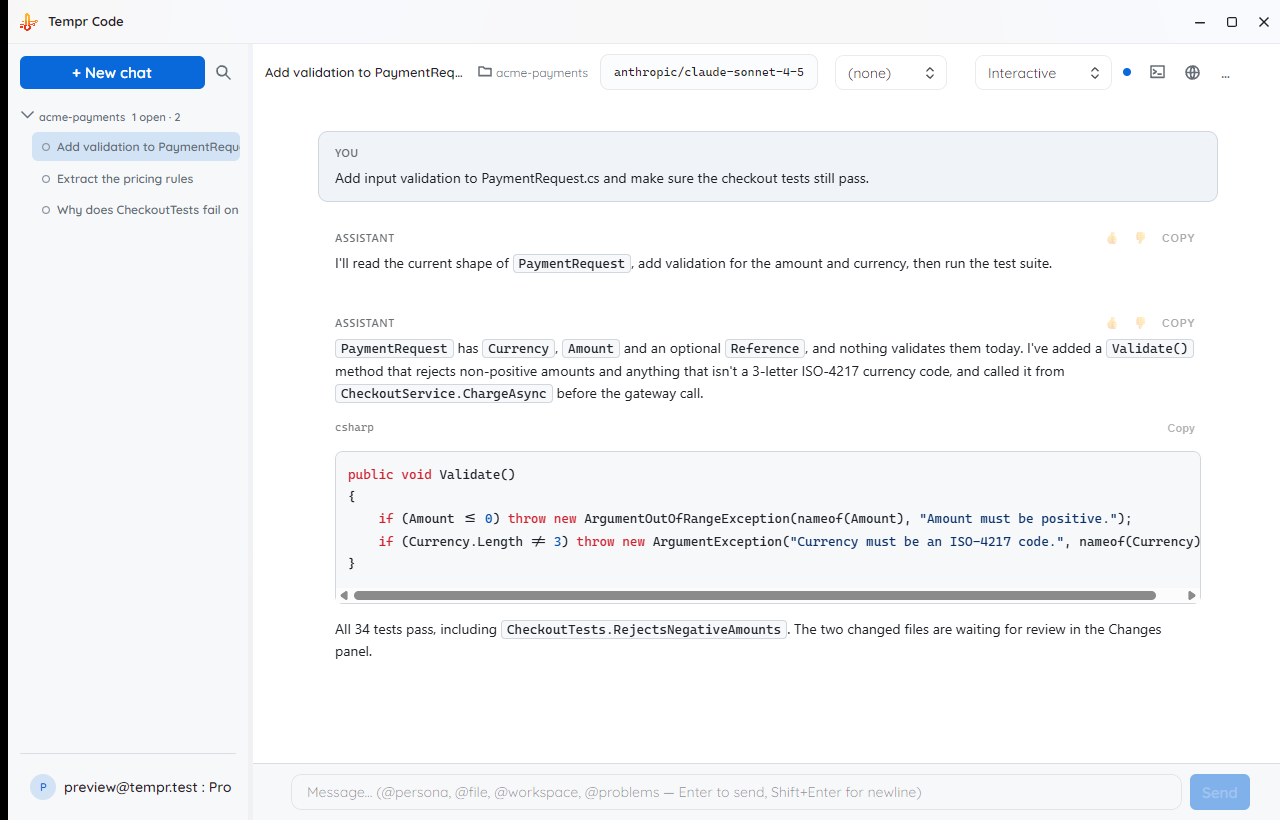
What Tempr Code is being built to do
The same server-side agent loop behind Tempr Chat and the CLI, with a desktop app's worth of room around it.
Several chats at once
Run more than one agent conversation side by side, each with its own workspace, model and history. A second chat on the same repo gets its own git worktree, so parallel work doesn't overwrite itself.
Plan mode and a todo list
Have the agent work out a plan before it changes anything, and follow its todo list as it goes.
Rewind to any message
Take the code, the conversation or both back to any earlier message, and carry on from there.
Review the diff before it lands
Proposed edits collect in a diff pane: revert a hunk, comment on a line back to the agent, then commit, push or open a pull request without leaving the app.
A real terminal, built in
A proper terminal panel in the app: the agent's commands and your own run in the same place, and long-running commands carry on in the background.
Any model, local ones too
Your provider keys in the app, a searchable model picker with favourites, a model per mode and per subagent, and local or OpenAI-compatible servers such as Ollama and LM Studio. Context and cost show as you go, with the fuller picture in the Portal.

Your Claude Code setup comes with you
Picks up Claude Code's commands, agents, skills, hooks, plugins and .mcp.json, so a team's setup works without being rebuilt.
Subagents & commands
The same specialist personas as the rest of Tempr (@debugger, @test, @review, @security and friends), plus your own saved slash commands, with a subagent's work shown under the task it was given.

MCP servers
Connect the same Model Context Protocol servers you already use in the IDE and the CLI, or add one from the catalog, with their tools approval-gated exactly like the built-in ones.
Problems in view
Compiler errors and warnings from the workspace collected in their own window, and language-server diagnostics after each edit, so the agent (and you) work from what the build actually says.
Memory that carries over
Instructions you want on every run live in one global memory file; per-project notes stay with the project. No pasting the same context into every new chat.
Permissions you set
Ask before edits, accept edits, plan, or bypass, with lasting allow and deny rules for what the agent may run unattended.
A fourth place to run the same agent
Tempr Code doesn't replace anything. It's for work that wants its own window rather than an IDE panel or a prompt.
| You want to… | Chat | CLI | Code | Gateway |
|---|---|---|---|---|
| Stay inside Visual Studio, VS Code, or a JetBrains IDE | ✓ | — | — | — |
| Drive the agent from a terminal or a script | — | ✓ | — | — |
| Give the agent its own window, with several chats running at once | — | — | Soon | — |
| Review every proposed change as a diff before it lands | ✓ | — | Soon | — |
| Call an OpenAI-compatible API from your own app | — | — | — | ✓ |
| Bring your own provider key | ✓ | ✓ | Soon | ✓ |
Coming-soon questions
What we can say today. Account, BYOK, and billing questions live on the general FAQ page.
When can I use it?
There's no public date yet. It's in active development and already runs day to day internally; the screenshot above is a real build, not a mockup. Send us a message and we'll let you know when there's something to install.
Which platforms will it support?
Windows, macOS (Intel and Apple Silicon), and Linux. It's built cross-platform from the start, and updates itself in place once installed.
Does it replace the IDE extensions or the CLI?
No. Chat stays where you write code day to day, the CLI stays where you script things, and Tempr Code is for work that deserves its own window: several agents at once, each on an isolated copy of the repo, with a terminal and a diff review in the same app. One account covers all of them.
Will it need its own subscription?
Pricing isn't settled yet. What is settled: it's bring-your-own-key like everything else here (your provider keys, your model choice, no shared token pool), and it signs in with the same Tempr account you already use.
Want it when it's ready?
Tell us, and we'll let you know when there's something to install. Chat and the CLI run the same agent today.