

Ask for a model, not a host
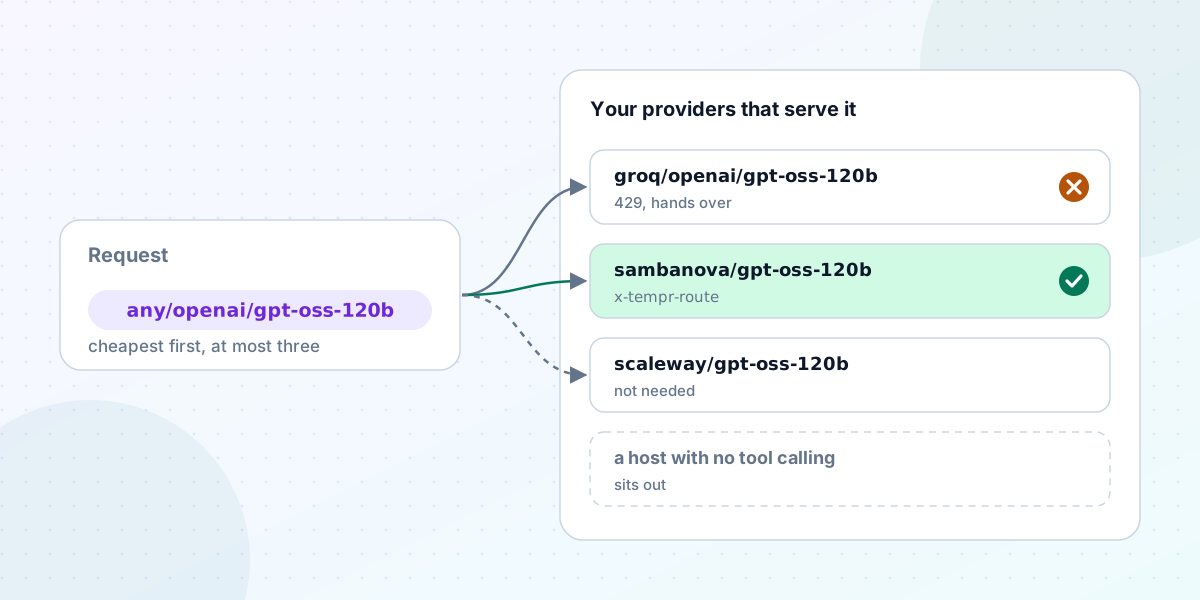
An open-weight model doesn't live in one place. gpt-oss-120b, for example, runs on Groq, SambaNova, Scaleway, IONOS, DigitalOcean and more, and the Tempr Gateway takes a key for each of them. That's useful: if one host is rate-limiting you or down, another has the same weights.
It's also a small mess, because each host names the model its own way. Through the Gateway, the same model is groq/openai/gpt-oss-120b, sambanova/gpt-oss-120b, scaleway/gpt-oss-120b, ionos/openai/gpt-oss-120b and digitalocean/openai-gpt-oss-120b. Until this week, using several of them meant writing a fallback chain by hand, listing every id, and keeping it up to date as you added or removed provider keys.
This week's Gateway release turns that around: you name the model, and Tempr works out where it can run.
Pools
Ask for a model as any/ followed by its shared id:
{ "model": "any/openai/gpt-oss-120b", "messages": [{ "role": "user", "content": "Hello" }] }Tempr runs it on whichever of your providers serve that model. A pool is a fallback chain Tempr writes for you: its hosts are the providers you hold a key for that list the model. The request goes to the cheapest host first, then hands over to the next on a 429, 401, 402, 403 or 5xx, trying at most three. The response's x-tempr-route header names the host that answered, and the request log keeps the pool as the model you asked for.
The shared id comes from the model's entry in models.dev, which is also where the public catalog gets it. /v1/models lists the pools your key can use, the catalog lists them all, and the Portal's new Models page shows each pool with your hosts' prices, limits and capabilities, plus the hosts you'd get by adding one more key. A fallback chain can name a pool among its models, so you can still write "Claude first, then this model anywhere".
Pools are on every Gateway plan, Free included.
The same weights aren't always the same model
We want to be plain about the limit here. Two hosts serving the same weights can still differ: in output limit, in quantization, and in how they handle reasoning. Tempr goes by what each host's catalog entry says and maps reasoning settings for each host (the reasoning post covers how), but it doesn't promise identical answers from every host in a pool. If a workload depends on one host's exact behaviour, name that host.
One more exception: NVIDIA's free hosted models are for prototyping only, so they join a pool only when a request or key names nvidia explicitly.
A 400 that never handed over
Pools rest on a fix for a problem fallback chains already had.
A chain hands over on rate limits, auth errors and server errors. It doesn't hand over on a 400, because a 400 usually means the request itself is wrong, and sending a wrong request to the next model just fails again. But some 400s aren't about the request. Send function tools to a model that has no tool calling, or an image to a text-only model, and that model answers 400. The chain stopped there, even if the next model could have answered.
This matters more for a pool, because a pool's order is set by price, not by you. So before trying anything, Tempr now checks each model against what the request needs, using its catalog entry:
- No tool calling: it sits out a request with function tools.
- No JSON schema output: it sits out a request asking for one.
- No image input: it sits out a request with an image.
- A context clearly too short for the prompt: it sits out too.
What a model's entry doesn't say counts as supported, so a model is only left out when its entry says it can't. The request log lists the models left out and why. If every model is left out, the request fails with no_capable_candidate and no provider is called.
Output limits got a softer rule. A model whose stated output limit is short for the request, below its max_tokens or below 32,768 tokens when it sets none, isn't left out but tried after the others. Without that, a cheapest-first pool would tend to land on the host with the smallest limit and cut long answers off. The details are in models that can't take the request.
Choosing hosts
Many clients already send OpenRouter's provider object to say which hosts they want. The Gateway now reads it under the same names, so those clients work unchanged:
{
  "model": "any/openai/gpt-oss-120b",
  "provider": { "order": ["groq", "cerebras"], "ignore": ["deepinfra"], "max_price": { "prompt": 0.5, "completion": 1 } },
  "messages": [{ "role": "user", "content": "Hello" }]
}
It takes only, ignore, order, sort, max_price and allow_fallbacks. Fields Tempr doesn't support, such as quantizations, are ignored rather than refused, and named in the x-tempr-ignored-provider-fields response header so you can see they had no effect.
A key can hold the same object as its default, in the key editor's Routing section or as routing_policy on the management API. A request can narrow what the key allows but not widen it: if the key ignores a host, no request on that key can bring it back. When the preferences leave nothing to try, the request fails with no_allowed_candidate, again without calling a provider. See host preferences.
A host that hasn't started answering
Some failures aren't errors. A host accepts a streamed request and then says nothing for a long time. With first_byte_timeout_ms (1,000 to 600,000), a streamed request moves on from a host that hasn't started its answer in that time, as it would after a 5xx.
It has deliberate edges. It's off unless you set it. The last host tried has no timeout, so the request always ends with someone's answer or error. And once an answer has started, it's yours: an error mid-stream is passed on as it is, never retried elsewhere, because a client can't be handed half an answer from one model and the rest from another. Requests that don't stream aren't timed. See first-byte timeout.
Routing rules
The last piece decides where a request goes based on what it is. On Gateway Pro and up, a key can hold up to 20 rules, one a line:
model=fast* tools=yes prompt>20000 -> any/openai/gpt-oss-120b
metadata.team=search -> groq/openai/gpt-oss-120b
header.x-env=staging -> cheap
A rule can match the model asked for, x-tempr-metadata values, the end user, the team, a header, whether the request uses tools or images, and its prompt size. The first rule that matches wins, and the x-tempr-rule header and the request log say which one. The key editor has a tester, so you can try a sample request against rules before you save them. On Free, saved rules are kept but not applied. See routing rules and the pricing page for what each plan includes.
Where to start
If you already hold keys for two or more hosts, open the Portal's Models page to see which pools you can use today, then point a request at any/ and check x-tempr-route to see where it went. The providers page lists every host the Gateway takes a key for.