

What an MCP gateway does for a team
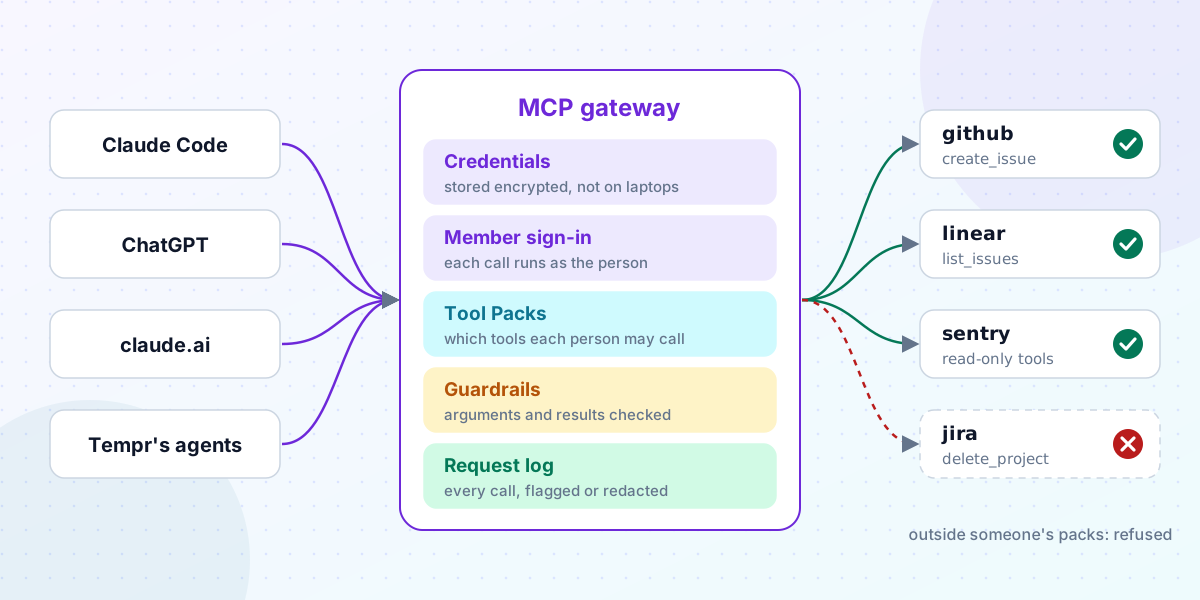
For one developer, MCP is simple. You add a server to your editor's config, paste a token, and the agent can open issues or search docs. Nobody else is involved, so nobody else needs to know.
A team is different. Ten people with ten configs means ten copies of a token, ten sets of tools, and no answer to "who asked the agent to do that?". The usual fix is an MCP gateway between the agents and the servers, but the name doesn't say what it should do.
Here's the list we work from, and how Tempr's Gateway handles each item. The first MCP post covers the relay itself in depth; this one is about the whole job.
1. Keep the credentials in one place
The first job is to get tokens off laptops, where they get copied, committed and forgotten.
In Tempr, a remote MCP server is added once in the Portal, with its address and any headers it needs. They're stored encrypted on Tempr's servers, and the relay adds them to each request on its way out. Tempr's IDE extensions and CLI reach the server through the relay, and any other MCP client can use it at /mcp/proxy/{server} with a Gateway key.
2. Sign each member in as themselves
A shared token in a gateway is still one account: every agent acts as the same bot, with that bot's access.
So the second job is per-member sign-in. For servers that use OAuth, such as Linear, Notion or Sentry, Tempr signs each member in with their own account, and their calls run with their own permissions. Tempr registers itself with the server's OAuth provider where the provider allows it, or uses an OAuth app you register where it doesn't, as GitHub requires. A member who hasn't signed in yet still sees the tools, and their first call asks them to sign in with a link their editor shows. The sign-in post covers the catalog of servers that have this filled in.
Owners and admins see who's signed in, with which account and scopes, and can revoke one member or everyone. When someone leaves the organization, their sign-ins are revoked.
3. Decide which tools each person may call
A server's tools aren't equally safe. list_issues on Linear, create_issue on GitHub and delete_project on Jira carry very different stakes, and a server's read and delete tools come under the same sign-in. A gateway that only decides "this server, yes or no" can't tell them apart.
Tempr does this with Tool Packs. A pack is a named set of tools: for each server, all of its tools, all except some, or only the ones you pick. There's a button that picks the tools a server marks read-only. Owners and admins give packs to groups, to members or to keys, and groups can be mirrored from your company directory, so someone who changes team gets the new team's tools without anyone editing them.
A tool outside someone's packs is left out of their tool list, and a call to it is refused before it reaches the server. To be exact about what packs are: they're allow-lists. A member gets every tool in every pack given to them, and there are no deny rules, so a tool left out of one pack can still come from another. Built-in tools such as the shell and file edits aren't part of Tool Packs; personas and approval modes govern those.
A refusal also carries a link to ask for the tool, with a reason. Owners and admins approve it for an hour, a day, a week or with no limit, or decline it, on the Requests tab. The details are under Tool Packs and asking for a tool.
4. Check what goes in and what comes out
Tool traffic runs in two directions, and both carry risk. An agent can paste a secret into a tool call's arguments. A tool's result goes straight into the model's context, and it can carry text written to steer the model.
Tempr's relay runs three checks, set for your account or your organization, and a key can override them. By default, secrets and personal data in a tool call's arguments are flagged, the same kinds of data in a tool's result are redacted before the model reads them, and text shaped like instructions to the model is flagged. Each check can be set to block instead. Hidden characters that can carry instructions a person can't see are removed. A guardrail tester shows what a result would look like to the model before you rely on the settings. The guardrails reference lists the categories.
The limit is worth saying plainly: these checks catch common shapes. They aren't a data-loss-prevention product, and no filter makes prompt injection impossible.
There's a quieter risk too. A tool's description is an instruction the model follows, and a server can change it at any time. Tempr pins each tool's name, description and input schema the first time it sees them, and when a server changes one, the change goes to your organization's audit log and to your Gateway webhook as mcp.tool_changed.
5. Keep a record
The last job is the one a security review asks about first: what happened? Every relayed tool call is in the request log, with its server, its tool, and anything that was flagged or redacted. Logs are kept for 7 days on Free, 30 on Pro and 90 on Scale, with longer retention on Enterprise. Changes to Tool Packs, every tool request and its outcome, and each new app connection are in the organization's audit log.
The same rules in every app
Tempr's agents use the relay directly. claude.ai, Claude Desktop, ChatGPT and Claude Code reach the same servers through an MCP connector: one URL, https://api.temprhq.io/mcp/connector, where the app signs in to Tempr rather than to each server. Calls through a connector go through the same Tool Packs, guardrails and request log. An organization can also limit which apps members may connect.
What's on which plan
The relay, per-member sign-in, connectors and MCP guardrails are on every Gateway plan, Free included. Tool Packs and member groups come with Gateway Pro, Scale and Enterprise, and with Tempr Agents Teams. The pricing page has the full list, and the MCP governance page shows it all in one place.
If you're starting out, add one server in the Portal, turn on member sign-in, and look at its calls in the request log. Tool Packs can come later: an organization with no packs keeps everyone's access as it is, and turning them on starts with a default pack that has every tool, so nobody loses access until you narrow it.