

Dictating to a coding agent
A good prompt for a coding agent is often long. It names the files, says what's wrong, what you've already tried and what you don't want touched. Typing all of that is slow, so prompts get shorter than they should be, and the agent guesses at the rest.
Talking is faster. This week voice input shipped across Tempr's agents: the CLI from 0.9.25, Tempr Chat for VS Code and JetBrains IDEs from 1.1.28, Tempr Chat for Visual Studio from 2.3.12, and the Tempr Code preview. Here's how it works, and the choices behind it.
Dictation, not a conversation
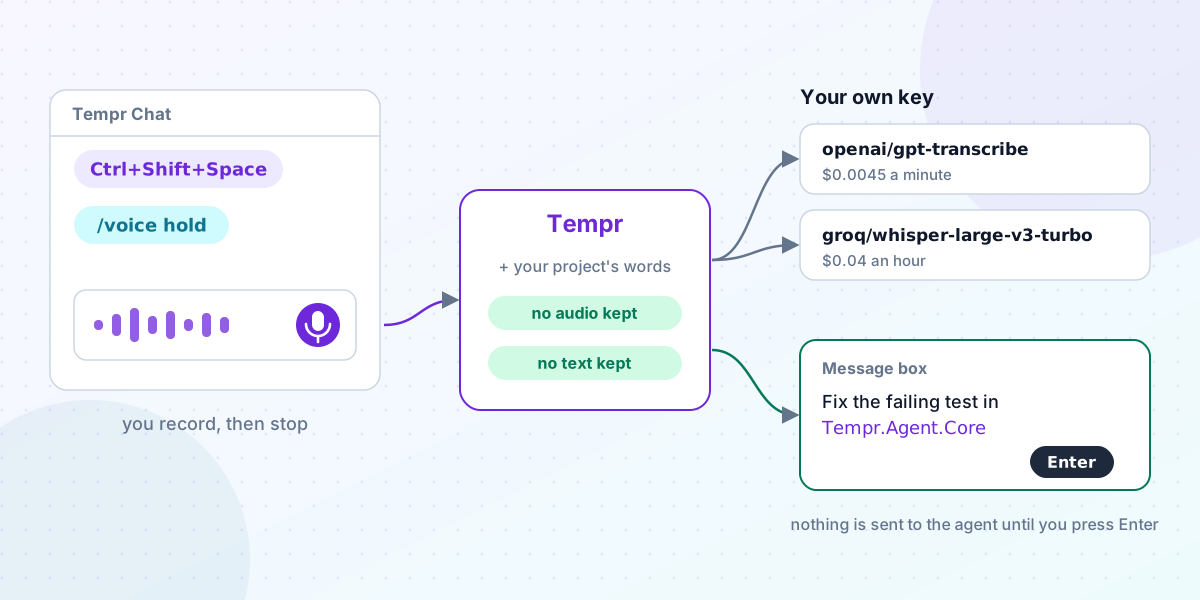
You start a recording, talk, and stop. The text lands in the message box, and nothing goes to the agent until you press Enter. The agent never hears you; it reads the message you send.
We kept it that way on purpose. Speech-to-text gets things wrong, and a misheard file name or a dropped "don't" changes what the agent does. A step where you read the text and fix a word is cheap, and it means voice never sends anything you didn't see.
In the IDEs and Tempr Code there's a mic button in the message box, and Ctrl+Shift+Space starts and stops a recording. Esc throws it away. In the IDEs, while you talk, a line under the box shows a level meter, then "Transcribing...". A recording stops by itself at two minutes, or after 15 seconds of quiet once you've started talking, and a recording with no speech in it isn't sent at all.
Hold Space in a terminal
In the CLI, /voice records until you press Enter. From 0.9.27 there's also a voice key: /voice hold lets you hold Space on an empty prompt, talk, and let go.
That sounds simple, but a terminal doesn't tell a program when a key is let go. It only sends key presses. So the CLI tells a held Space from a typed one by your keyboard's auto-repeat: a held key starts repeating after a short delay, a tapped one doesn't. The cost is that a single Space on an empty prompt appears after your repeat delay (half a second on most computers) rather than at once. With text in the prompt, Space types straight away. For terminals that don't repeat keys, /voice tap uses a key that starts and stops recording instead, Space by default or one you pick, such as f9.
Over SSH the voice key is off, with a notice. The microphone would be the other machine's, not yours. For the same reason, the IDEs don't offer the mic in a remote window or on a JetBrains Remote Development host.
Recording without installing anything
Recording audio from a terminal or an editor usually means installing a command-line recorder first. We wanted voice to work with what your computer already has:
- Windows: Windows' own audio, in the CLI, VS Code and Visual Studio.
- macOS: the Mac's own audio from CLI 0.9.26. The first release needed SoX; it doesn't any more. The first time, macOS asks to let your terminal or IDE use the microphone.
- Linux: the first of
arecord,pw-record,parecordor SoX'srecon your PATH. - JetBrains IDEs record through Java.
One honest note: the VS Code extension's Mac path hadn't been tried on a real Mac when 1.1.28 shipped, and its changelog says so. If it doesn't work for you, tell us.
On your own key
Transcription runs on your own OpenAI or Groq key, the same way the agent's models run on your own provider keys. Your provider bills you for it, and Tempr charges nothing per transcription. Each one shows in your usage like any other request, with its cost worked out from the recording's length.
/voice models in the CLI, and the Voice section of each app's settings, list the speech-to-text models your keys can use, with their prices:
openai/gpt-transcribe: $0.0045 a minuteopenai/gpt-4o-mini-transcribe: $0.003 a minuteopenai/gpt-4o-transcribeandopenai/whisper-1: $0.006 a minutegroq/whisper-large-v3-turbo: $0.04 an hour, at least 10 seconds a recordinggroq/whisper-large-v3: $0.111 an hour, at least 10 seconds a recording
With no model picked, Tempr uses GPT-4o mini Transcribe if you have an OpenAI key, else Whisper Large v3 Turbo on Groq. You can also name the language you speak, or leave it empty for the model to work it out.
OpenAI has announced that it shuts down whisper-1, gpt-4o-transcribe and gpt-4o-mini-transcribe on February 26, 2027. From that day, a recording sent to one of them goes to openai/gpt-transcribe instead, at its price, and that becomes the default for OpenAI keys. Nobody has to change a setting to keep dictating.
Spelling your project's words
General speech models don't know your code. A project name like Tempr.Agent.Core is easy to say and easy for a model to spell some other way.
So with each recording, Tempr sends the provider a short list of words to steer the spelling: the project folder's name, the names of the files and folders at its top level, and the model's name. It's a small hint, not a dictionary, but it fixes the words you say most often in a coding session: the names in your own repository.
What's sent and kept
The recording goes from your computer to Tempr's servers and on to OpenAI or Groq under your key. Tempr doesn't store or log the recording or the text. It records the provider, model, length and cost of each transcription, as it does for any request. The provider handles the recording under its own terms. The privacy policy says the same.
If you'd rather nothing leave your computer through Tempr, your operating system's own dictation types into Tempr too: Win+H on Windows, Fn twice on a Mac. Linux desktops have no dictation of their own.
The same thing for your own apps
The Gateway serves the same transcription as POST /v1/audio/transcriptions, OpenAI's speech-to-text API, on your virtual keys, limits and logs. Any OpenAI SDK pointed at Tempr can use it.
It takes one audio format, 16-bit PCM WAV in mono, up to about two and a half minutes. That's a real limit, and the reason is cost: with one format, the Gateway measures each recording's length, and with it the price, from the audio itself rather than trusting what a provider reports. Anything else gets 415 unsupported_audio; one ffmpeg line converts it. The audio is never logged. The transcriptions reference has the details.
Trying it
You need an Agents plan, an OpenAI or Groq key in your provider keys, and a microphone. Update the CLI or your IDE extension, then type /voice or click the mic. The voice input docs cover every client, the settings and the error messages.