

Plan first, then pay-as-you-go
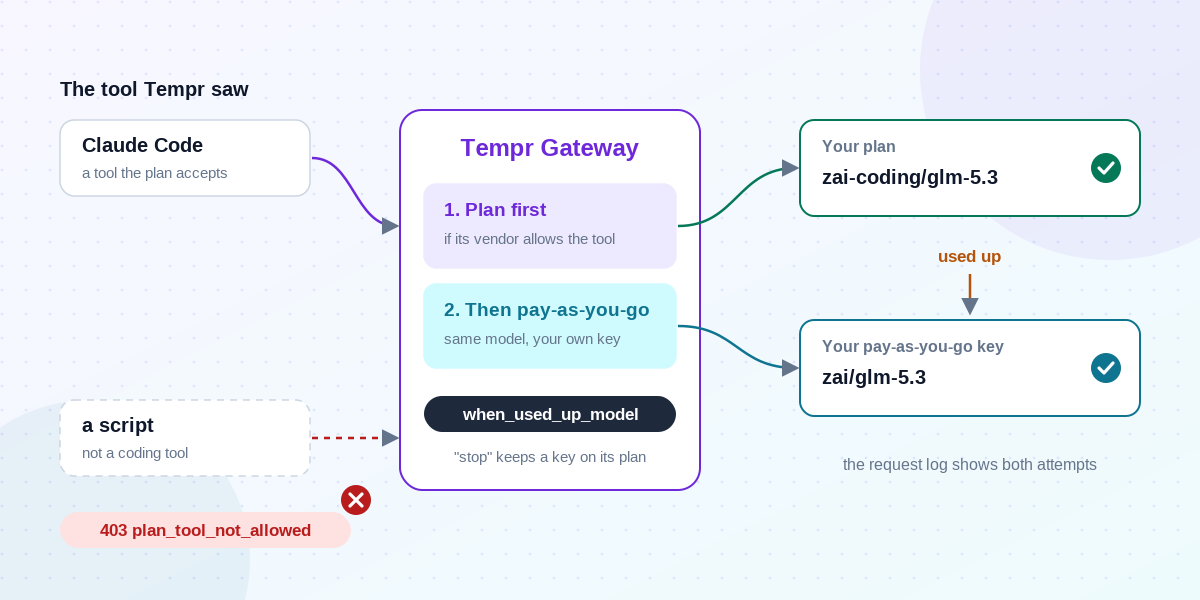
Many developers run their coding agent on a flat-rate plan instead of per-token API prices: a Claude plan in Claude Code, a ChatGPT plan in Codex, or a coding plan such as Kimi Code or the MiniMax M Plan. Tempr Gateway carries those plans. The plan keeps paying, and every request gets your key's logs, limits and guardrails.
A plan differs from an API key in two ways. It comes with terms about what may use it, and it runs out. This week's Gateway releases deal with both, and one of them makes Tempr refuse requests it used to serve.
A plan is sold for a tool
Most vendors sell their plan for the coding tools they support, and many bar scripts, app backends and other API use. A gateway could hand a plan to anything that can send a request. Since November 18, Tempr serves a plan only to the tools its vendor's terms allow, on every request.
Each coding plan follows one of three rules, taken from its vendor's docs (checked on November 19, 2026):
- Named tools only. The vendor lists the tools its plan supports. The Z.AI GLM Coding Plan is one: Tempr accepts Claude Code, Codex, OpenCode, Kilo Code, Roo Code or Crush for it, and nothing else.
- Coding tools only. The vendor allows coding tools in general, but not scripts or apps. Kimi Code and the KUAE Cloud Coding Plan work this way.
- Any tool. The MiniMax M Plan accepts any compatible tool, so even a plain curl request works.
The other two kinds of plan are stricter. A Claude plan's sign-in is accepted only from Claude Code, and a ChatGPT plan's only from Codex, each vendor's own tool.
A request from anything else gets a 403 with the code plan_tool_not_allowed. The message names the tools the plan accepts and the tool Tempr saw, and the request log shows the tool too. In a fallback chain, a plan the tool can't use is skipped rather than failing the request.
How Tempr knows the tool
Tempr recognises a tool by the identity it sends with each request: its User-Agent and its own headers. It never changes that identity on the way to the plan.
This has a real cost. Some tools send only a generic identity to a custom endpoint, so Tempr can't tell them from a script. Cline, Continue, Aider and Cursor are among them. A plan that names its tools refuses them through Tempr, even where the vendor itself supports them. They can use only the plans that accept any tool.
Two more refusals
Two more rules come from vendors' terms, and neither is about tools.
Chutes isn't served at all. Its terms (November 2026) bar giving any third party direct access to your API keys, which using a Chutes plan through Tempr would do. Its plan requests now get plan_tool_not_allowed.
One-person plans aren't shared. Most coding plans are for one person, and several forbid sharing one. An organization can store a plan's key for all its members only when the plan is sold as a team edition: the Alibaba Cloud Token Plan, OpenCode Go and Ollama Cloud. For every other plan, each member sends their own plan key with their requests, and an organization key that would share one gets plan_shared_not_allowed.
When the plan runs out
The second change is about the other end of a plan. A plan has rate and quota limits, and an agent tends to reach them in the middle of a task. Until this week, the request stopped there with the plan's error, unless the key named a model to carry on with.
Since November 20, plans come first and pay-as-you-go after them. When the plan paying for a request says it's used up, the request goes on at once to the same model on a pay-as-you-go key you've stored:
- Claude Code on a Claude plan carries on with the same Claude model on your Anthropic key.
- Codex on a ChatGPT plan carries on with the same model on your OpenAI key, when OpenAI's API offers it. Reasoning from one account can't be read by the other, so the API gets the conversation without it.
- A coding plan's model carries on with whichever of your provider keys serves the same model, the model maker's own API first:
zai-coding/glm-5.3carries on aszai/glm-5.3.
Only a used-up plan does this. Any other error from the plan, such as a bad key, comes back as it is, so nothing is spent on the API by mistake. With no pay-as-you-go key for the model, the plan's own error comes back. The request log shows both attempts.
It works the other way round too. Ask for zai/glm-5.3 with a Z.AI plan key stored, and the plan pays until it's used up, when the plan's terms allow the tool you're calling from.
Keeping a key on its plan
Carrying on means spending money a plan user may not have meant to spend, so there's a switch. Each key has a used-up model, in the Portal's key settings under "When the plan or budget runs out", or when_used_up_model on the management API:
{ "when_used_up_model": "stop" }With stop, a used-up plan's requests stop with the plan's error, as before. You can also name another model, such as openai/gpt-5, to carry on there instead. A key with a model allowlist uses only the models on it, plans and pay-as-you-go alike.
Tempr's own apps, under the same rules
Coding plans also arrived in Tempr's own apps this week: the CLI from 0.9.29, Tempr Chat for VS Code and JetBrains IDEs from 1.1.31, Tempr Chat for Visual Studio from 2.3.14, and the Tempr Code preview from 0.1.2.
They get no exception. The apps send Tempr's own identity, never another tool's, so a plan works in them exactly when its rule admits Tempr. Plans open to any tool or to any coding tool work now. A plan whose vendor names its tools waits until that vendor names Tempr, which today includes the Z.AI GLM Coding Plan and OpenCode Go.
Two more limits apply there. A plan answers the turns you're at the keyboard for: scripts, CI and scheduled tasks can't use one, except ClinePass, whose vendor allows your own automation. And when a plan runs out, the apps don't carry on by themselves. They say so and offer a Switch model action, and the CLI points you to /model.
What stays yours
Tempr enforces each vendor's rule on which tools may use its plan. The rest of a plan's terms are still yours to keep, including its limits on personal use. Read them before you rely on a plan, and keep each plan to the person who pays for it.
The docs have the full list: which tools each plan accepts, Claude and ChatGPT plans through the Gateway, and when a plan runs out.